Top QR Code Generators with API Access for Developers
To create a QR code for a link, video or picture - click on the button below.

QR codes have quickly become a cornerstone of modern digital interactions. From marketing campaigns to event check-ins, these codes enable a seamless connection between physical and online experiences. For developers, the ability to create QR code and integrate it into apps, websites, or SaaS platforms is crucial. Using a reliable QR code generator allows developers to automate creation, manage bulk codes, and implement both static and dynamic QR codes efficiently.
Static QR codes remain constant and are ideal for linking to fixed content such as menus, brochures, or contact information. Dynamic QR codes, on the other hand, can be updated after printing, track engagement, and provide analytics, making them perfect for marketing campaigns or personalized user experiences. Whether you’re experimenting with a free QR code maker for static codes or building complex systems using dynamic codes, understanding the differences and capabilities of each type is essential.
Exploring QR Code APIs for Developers
APIs provide developers with a programmatic way to develop QR code solutions without relying on manual generation. With an API, you can generate static codes for simple content or dynamic codes that update automatically and track engagement. For instance, a QR code generator API allows you to create QR codes on the fly, embed them in user dashboards, or deliver them as part of transactional emails.

Static vs Dynamic QR Codes
- Static QR Codes: Fixed content, no tracking, ideal for permanent links. Often generated using a QR code generator.
- Dynamic QR Codes: Editable content, scan tracking, analytics available. APIs like dynamic QR code API enable developers to manage these codes efficiently at scale.
Integration into Applications
A robust API QR code generator supports integration across web, mobile, and SaaS platforms. Developers can automate bulk generation of static QR codes for menus or product labels, while dynamic QR codes can be used for tracking campaign performance, redirecting users, or delivering personalized content.
Using a QR code generator rest API, it is possible to:
- Create codes with custom logos and branding.
- Track scan locations, devices, and timestamps.
- Update dynamic codes without reissuing them.
Free vs Paid QR Code API Options
Developers often start with create free QR code generator for testing purposes. These options provide basic functionality for static codes, while paid APIs offer advanced features like bulk creation, analytics, and SDK support.
Understanding QR Code APIs and Their Advantages
A QR code API goes beyond a standard QR code generator by allowing developers to programmatically create, manage, and track codes efficiently. Unlike manual generators, APIs automate workflows, saving time and ensuring consistency. Using a generate QR code API, developers can embed QR code creation into web apps, mobile apps, or SaaS platforms, supporting dynamic codes for personalized links, updates, or redirects.
With a create QR code API, customization and automation are simplified:
- Add logos, colors, and frame styles to match branding.
- Generate codes in bulk or on a schedule.
- Track scans, devices, and engagement metrics.
Dynamic QR codes offer flexibility over static codes, enabling content changes while collecting valuable analytics for marketing, events, and real-time content delivery.
Criteria for Choosing the Best QR Code API Tools
Selecting the right QR code generator API requires evaluating technical and practical factors. Stability and uptime ensure QR codes are reliably generated, while clear documentation and SDK support in languages like Java, PHP, or JavaScript simplify integration and reduce development time. Free QR code APIs allow basic static or limited dynamic code creation, whereas paid plans provide bulk generation, analytics, and custom branding.
A good QR code API should support both static and dynamic QR codes, offering flexibility for various projects. Bulk creation saves time for large campaigns, and consistent documentation with developer support ensures smooth implementation. By considering scalability, cost, and technical support, developers can choose a platform that meets current needs and future growth.
Leading QR Code Generators with API Support
Finding the right QR code generator API lets developers create static and dynamic QR codes efficiently. Static codes suit menus or fixed URLs, while dynamic codes enable real-time updates, analytics, and personalized redirects.
A dynamic QR code generator API streamlines workflows with bulk generation, custom logos, and embedded tracking, reducing manual effort and ensuring consistent branding across web, mobile, and SaaS platforms.
1. ME-QR
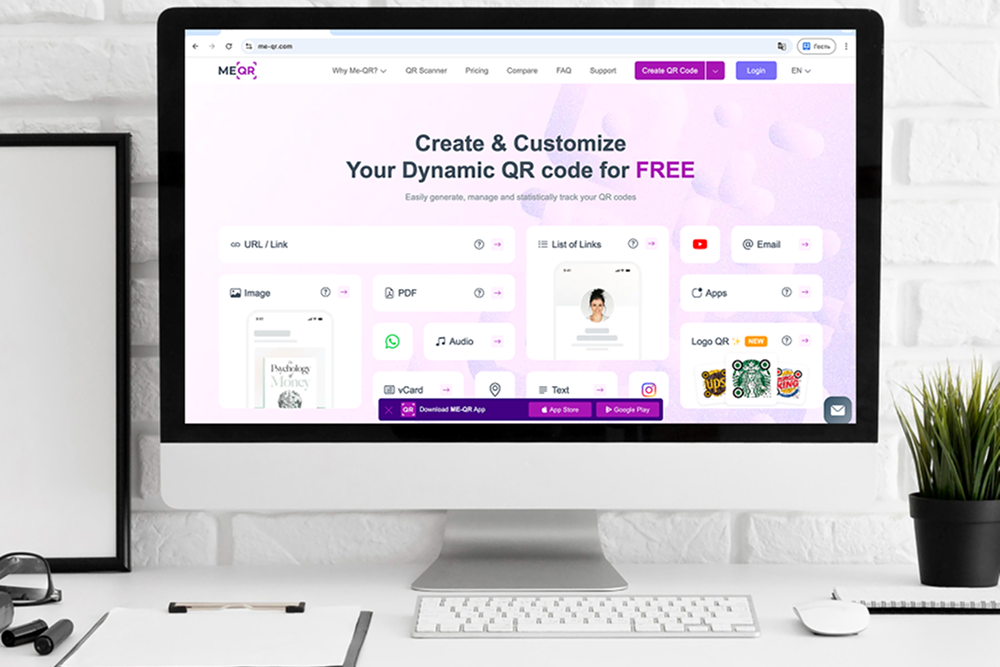
ME-QR offers a versatile QR code generator API that supports both static and dynamic QR codes. Static codes are perfect for menus, product labels, or fixed URLs, while dynamic codes allow real-time updates, tracking user scans, and personalized content delivery. Developers can use the dynamic QR code generator API to automate large-scale QR code creation for marketing campaigns or SaaS platforms.
Using the ME-QR QR code generator rest API, you can:
- Create QR codes with custom logos, colors, and frames.
- Monitor scan locations, devices, and timestamps.
- Update dynamic QR codes without reissuing them.
ME-QR also supports bulk QR code generation, making it ideal for businesses that need hundreds or thousands of codes quickly. Integration options include Java, PHP, and JavaScript SDKs, enabling developers to embed QR code creation directly into their applications. Its dashboard also provides analytics for dynamic codes, helping teams track engagement and optimize campaigns efficiently.
Pros: Free static QR code generation, dynamic QR codes via API, bulk creation, branding customization, cross-platform SDK support.
2. QuickChart
QuickChart provides a lightweight API QR code generator with a simple rest interface for both static and dynamic QR codes. Static codes are ideal for dashboards, reports, and product labels, while dynamic codes allow developers to update content, track scans, and embed QR codes directly in web or mobile applications.
Using QuickChart’s API, developers can:
- Generate static or dynamic QR codes programmatically.
- Customize QR codes with basic colors, sizes, and error correction.
- Monitor dynamic QR code scans and integrate them with analytics platforms.

3. QRPlanet
QRPlanet offers a QR code generator API for both static and dynamic QR codes, making it suitable for developers looking to integrate QR code functionality into web apps or SaaS platforms. Static codes are perfect for fixed URLs or product labels, while dynamic codes allow content updates, scan tracking, and campaign management.
With QRPlanet’s API, developers can:
- Create bulk static and dynamic QR codes for marketing or internal use.
- Customize codes with colors, frames, and logos.
- Retrieve scan analytics for dynamic QR codes.

4. QRCodeKit
QRCodeKit provides a robust QR code API with support for static and dynamic QR codes, plus analytics and SDKs for JavaScript, PHP, and Java. Static QR codes are suitable for simple use cases like event tickets or product URLs, while dynamic QR codes allow real-time content changes, scan monitoring, and integration with marketing tools.
Using QRCodeKit’s API, developers can:
- Generate bulk static or dynamic QR codes programmatically.
- Add logos and brand-specific colors.
- Track scan metrics and export data for reporting.
Cons: The free tier is limited in features, some customization requires a premium plan.
Best for: Businesses and developers needing a full-featured QR code generator API with analytics and SDK support.

5. Scanova
Scanova offers a dynamic QR code generator API that enables developers to create static and dynamic QR codes with branding, analytics, and bulk capabilities. Static codes are perfect for menus, brochures, and labels, while dynamic codes support content updates, scan tracking, and integration with external tools like Google Analytics.
Developers can use Scanova’s API to:
- Generate QR codes programmatically for large campaigns.
- Customize with logos, colors, and design templates.
- Access scan metrics for dynamic QR codes.

6. GoQR
GoQR provides a simple QR code generator rest API for creating both static and dynamic QR codes. Static codes are ideal for fixed URLs and basic applications, while dynamic codes allow updates, tracking, and programmatic integration. GoQR’s API is lightweight and fast, making it suitable for quick embedding into websites or apps.
Using GoQR, developers can:
- Generate static or dynamic QR codes on demand.
- Customize size, color, and error correction.
- Monitor dynamic QR code scans.

7. MyQRCode
MyQRCode offers a create QR code API that supports both static and dynamic QR codes for developers. Static codes are ideal for products, menus, and fixed URLs, while dynamic QR codes allow content updates, scan tracking, and campaign automation. The API supports bulk creation and integration with web or mobile apps.
Developers can use MyQRCode’s API to:
- Generate QR codes in bulk with optional branding.
- Track scans and collect analytics from dynamic QR codes.
- Update dynamic codes without reissuing them.

8. Orca Scan
Orca Scan provides a flexible QR code generator API designed for businesses and developers who need both static and dynamic QR codes for inventory management, asset tracking, and marketing campaigns. Static codes are ideal for labeling products or equipment, while dynamic QR codes allow content updates, scan tracking, and integration with external databases or workflows.
Using Orca Scan’s API, developers can:
- Generate static or dynamic QR codes programmatically.
- Connect QR codes to inventory systems or asset management tools.
- Track scans and update linked content without replacing the code.

9. Hovercode
Hovercode offers a modern dynamic QR code generator API that focuses on branding, analytics, and marketing campaign management. Static QR codes work well for simple use cases like fixed URLs or menus, while dynamic QR codes allow marketers and developers to update content, track scan activity, and manage multiple campaigns efficiently.
With Hovercode’s API, developers can:
- Generate static and dynamic QR codes programmatically.
- Customize QR codes with brand colors, logos, and frames.
- Track scan analytics including location, device type, and time.

10. Unitag
Unitag provides a powerful QR code generator API that supports both static and dynamic QR codes, with extensive design customization and analytics tools. Static codes are suitable for product packaging or printed materials, while dynamic QR codes allow businesses to update content, monitor scan performance, and manage campaigns across multiple channels.
Using Unitag’s API, developers can:
- Generate QR codes with advanced design customization.
- Create and manage dynamic QR codes with real-time updates.
- Access scan statistics and export analytics data.

Key Benefits of Integrating QR Code APIs
Integrating a reliable create QR code API allows developers and businesses to automate bulk generation of static and dynamic QR codes, saving time and minimizing errors. Static codes suit fixed content like menus, product labels, or tickets, while dynamic codes can be updated in real time for promotions, URLs, or personalized user content.
Key automation advantages include:
- Bulk generation of QR codes for campaigns or product lines
- Scheduling QR code creation for periodic updates
- Reducing manual errors and streamlining workflow
Using an API QR code, teams can manage dynamic QR codes, track scans, monitor engagement, and update content without reissuing codes. This flexibility is ideal for marketing campaigns, SaaS platforms, or any project needing quick content adjustments.
Benefits of dynamic QR codes:
- Update URLs or content without changing the QR code
- Track scan metrics like location, device, and time
- Deliver personalized content based on user interaction
A custom QR code API lets developers add logos, colors, shapes, and frames to match a brand’s identity, enhancing recognition and user trust. Combined with automation for static and dynamic QR codes, this creates a flexible, efficient, and visually appealing solution for businesses of all sizes.
Quick Comparison of Top QR Code APIs
|
Tool
|
API Type
|
Free Plan
|
Free Plan
|
Static QR
|
Dynamic QR
|
Customization
|
SDK / Language Support
|
|
ME-QR
|
rest API
|
✅ Static codes
|
✅ Dynamic codes
|
✅
|
✅
|
Logos, colors, frames
|
Java, PHP, JavaScript
|
|
QuickChart
|
rest API
|
✅
|
✅
|
✅
|
✅
|
Limited
|
rest only
|
|
QRPlanet
|
rest API
|
✅
|
✅
|
✅
|
✅
|
Logos, colors
|
JS, PHP
|
|
QRCodeKit
|
rest API + SDK |
✅
|
✅
|
✅
|
✅
|
Logos, analytics
|
JS, PHP, Java
|
|
Scanova
|
rest API
|
✅ Static codes
|
✅ Dynamic codes
|
✅
|
✅
|
Logos, colors
|
rest, SDKs
|
|
GoQR
|
rest API
|
✅
|
✅
|
✅
|
✅
|
Limited
|
rest only
|
|
MyQRCode
|
rest API
|
✅
|
✅
|
✅
|
✅
|
Logos, colors
|
JS, PHP
|
|
OrcaScan
|
rest API
|
✅ Limited
|
✅
|
✅
|
✅
|
Basic branding
|
REST, API integrations
|
|
Hovercode
|
rest API
|
✅ Limited
|
✅
|
✅
|
✅
|
Logos, colors, frames
|
REST API
|
|
Unitag
|
rest API
|
✅ Limited
|
✅
|
✅
|
✅
|
Advanced design, logos, colors
|
REST API
|
How Developers Can Use QR Code APIs Effectively
Integrating QR code API tools into your applications can unlock powerful automation and tracking capabilities. Whether you’re building a web app, mobile app, or SaaS platform, using APIs allows developers to create QR code and dynamic QR codes programmatically, saving time and ensuring consistency across large-scale projects.

Practical ways developers can leverage QR code APIs:
- Embed QR codes in apps and websites: Automatically generate QR codes for user accounts, tickets, or product pages.
- Log scan activity: Track user interactions with dynamic QR codes, including timestamps, locations, and devices.
- Integrate with analytics platforms: Combine API to generate QR code with Google Analytics or internal dashboards for real-time monitoring.
- Bulk creation: Generate hundreds or thousands of static or dynamic QR codes for marketing campaigns or SaaS services.
- Automate updates: Modify dynamic QR codes without reissuing them, ideal for campaigns with changing content.
- Add branding and customization: Use custom QR code API features to include logos, colors, or frames to match your brand.
Best practices for using QR code APIs effectively:
1. Decide between static and dynamic QR codes:
- Use static QR codes for permanent content like menus or product labels.
- Use dynamic QR codes when content may change or when you need analytics.
2. Implement logging and analytics:
- Track scans, devices, and locations to measure engagement.
- Use dashboards or CSV exports to analyze results and refine campaigns.
3. Optimize for user experience:
- Ensure QR codes are high-resolution and test scanning across devices.
- Maintain consistent branding for recognition and trust.
4. Automate with scripts or SDKs:
- Use Java, PHP, or JavaScript SDKs to seamlessly generate QR codes from your backend or frontend.
- Schedule bulk generation for recurring campaigns.
By following these strategies, developers can fully leverage the capabilities of QR code generator API tools, whether for small projects or enterprise-grade solutions. Automation, analytics, and customization ensure QR codes are not just static links, but dynamic assets that engage users and streamline digital workflows.
Getting Started with QR Code APIs
Getting started with a create QR code generator free or paid API tool is simple once you know your project needs. Developers should decide whether static or dynamic QR codes are required, as static codes work well for menus or product labels, while dynamic QR codes enable tracking and analytics.
Free options like free QR code maker are great for testing or small projects, while paid plans offer bulk creation, customization with logos and colors, and advanced API features. By reviewing documentation and integrating the API into web or mobile applications, developers can quickly generate QR codes, automate workflows, and optimize campaigns efficiently.