당신을 위한 유용한 것들
당신이 관심을 가질 만한 흥미로운 것들을 선별했습니다
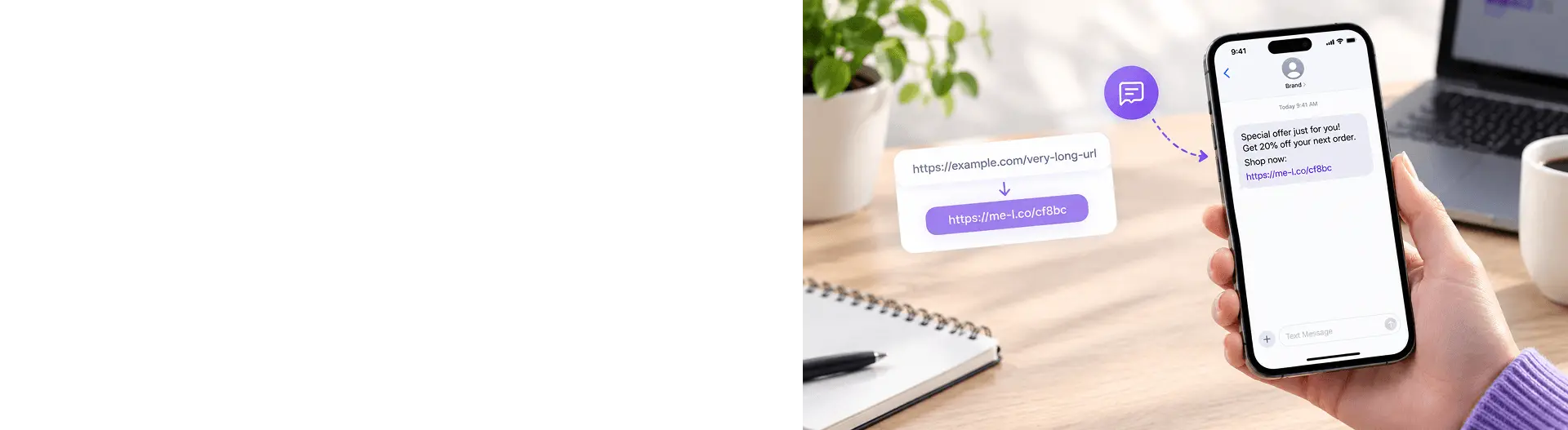
How to Use Short Links in SMS Campaigns
Short links make it easier to connect SMS messages with online destinations without filling the message with long URLs. They can be used for promotions, appointment reminders, delivery updates, booking confirmations, event notifications, and other customer communications.
For campaigns, combine short links with UTM parameters and link tracking to understand how recipients interact with your messages.

- Why Short Links Are Useful in SMS
- SMS Link Examples
- How to Write Clear SMS Messages
- Tracking SMS Clicks
- Using UTM Parameters in SMS Campaigns
- Ad-Free Links for Customer Messages
- Common Mistakes When Using Short Links in SMS
- Practical Example: SMS Promotion
- Practical Example: Appointment Reminder
- Best Practices for SMS Short Links
- Frequently Asked Questions
SMS messages have limited space, so every character matters. A long URL can make a message look cluttered, take up valuable space, and make it harder for customers to understand what to do next.
Short links provide a compact way to connect an SMS message with a website, booking page, payment page, tracking page, or other online destination.
They can be useful for promotional campaigns as well as practical customer messages such as appointment reminders, delivery updates, event notifications, and confirmations.
Why Short Links Are Useful in SMS
A short link turns a long web address into a compact URL that is easier to include in a text message.
For example:
Long URL: https://example.com/booking/appointment?customer=12345&source=sms&campaign=reminder
Short link: https://short.example/booking
The short version takes up less space and is easier for a recipient to recognize.
Short links can help you:
- keep SMS messages concise;
- make links easier to read;
- reduce the amount of text in a message;
- direct customers to specific pages;
- track link activity when tracking is available;
- organize links for different campaigns;
- update destinations when editable links are supported.
This is useful because an SMS often needs to communicate three things quickly:
- Why you're contacting the customer
- What they need to do
- Where they should go
For example: Your appointment is tomorrow at 10:00. Confirm here: short.example/confirm
The message is short, and the action is clear.
SMS Link Examples
Short links can be used for many types of customer communication.
Promotional SMS
A business launching a sale could send: Summer sale starts today. Get 20% off: short.example/summer-sale
The link takes customers directly to the relevant promotion instead of the website homepage.
Appointment Reminder
A service business could send: Reminder: Your appointment is tomorrow at 3 PM. Confirm your booking: short.example/confirm
The short link can lead directly to the confirmation page.
Delivery Update
An online store could send: Your order is on the way. Track your delivery: short.example/track
The customer can open the tracking page without searching for their order manually.
Event Reminder
An event organizer could send: Your event starts tomorrow at 7 PM. View tickets and event details: short.example/event
The link can take the recipient directly to the event information.
Booking Confirmation
A hotel, restaurant, or service provider could send: Your booking is confirmed. View your reservation: short.example/booking
Customer Support
A company could send: Need help with your order? View support options: short.example/help
The short URL takes the customer directly to the relevant support page.
How to Write Clear SMS Messages
A short link works best when the message around it is equally clear.
Avoid sending a URL without context.
For example: short.example/offer
This doesn't tell the recipient what the link does.
A better message is:
Your 15% discount is ready. View your offer: short.example/offer
The recipient immediately understands the purpose of the link.
Put the main information first
Tell customers why they are receiving the message before asking them to click.
For example:
Your delivery is arriving today. Track it here: short.example/track
This is clearer than:
Track here: short.example/track
Use one clear action
An SMS should usually have one primary call to action.
For example:
Confirm your appointment: short.example/confirm
is more direct than:
View your appointment, read our policies, update your details, and contact us: short.example/booking
If customers need multiple actions, consider sending them to a page where those actions are organized.
Keep the link near the action
Place the short link immediately after the instruction.
Examples:
- View your order: short.example/order
- Confirm your booking: short.example/confirm
- Get your ticket: short.example/ticket
This makes the connection between the action and the link obvious.
Tracking SMS Clicks
Short links can also help you measure how recipients interact with SMS campaigns when link tracking is available.
For example, suppose a business sends a promotional SMS:
New collection available now. Shop here: short.example/new-collection
The short-link analytics can show activity associated with that link.
Depending on the tracking features available, you may be able to analyze:
- total clicks;
- click dates and times;
- devices;
- countries;
- campaign activity.
Use separate links for different SMS campaigns
If you run multiple SMS campaigns, separate short links can make the results easier to compare.
For example:
|
Campaign |
Short Link |
Purpose |
|
Summer sale |
short.example/summer |
Promotional campaign |
|
Appointment reminder |
short.example/confirm |
Booking confirmation |
|
Delivery update |
short.example/track |
Order tracking |
|
Event reminder |
short.example/event |
Event information |
If you need detailed campaign attribution, you can also use UTM parameters in the destination URL.
For example: https://example.com/sale?utm_source=sms&utm_medium=sms&utm_campaign=summer_sale
You can then shorten the complete URL and use the short link in the message.
Using UTM Parameters in SMS Campaigns
UTM parameters can help you distinguish traffic generated by SMS from traffic from other channels.
For example: https://example.com/product?utm_source=sms&utm_medium=sms&utm_campaign=summer_sale You can then create a short link: short.example/summer
The customer sees the short link, while the destination URL contains the campaign information.
If you send multiple SMS campaigns, use a consistent naming convention.
For example:
- utm_source=sms
- utm_medium=sms
- utm_campaign=summer_sale
and later:
- utm_source=sms
- utm_medium=sms
- utm_campaign=black_friday
This can help your analytics platform distinguish the campaigns.
Before sending a large campaign, test the short link and verify that the UTM parameters are included correctly
Ad-Free Links for Customer Messages
Customer-facing SMS messages should focus on the action the recipient needs to take.
Ad-Free link that immediately takes customers to the intended destination can create a more direct experience than sending them through unnecessary intermediate pages or unrelated content.
For example:
Your order is ready for pickup. View details: short.example/pickup
The customer should be able to open the link and reach the relevant information quickly.
This is especially important for transactional messages such as:
- delivery notifications;
- appointment reminders;
- booking confirmations;
- payment notifications;
- event reminders;
- account-related messages.
For promotional messages, the same principle applies: the destination should match the promise made in the SMS.
If the message says: View your discount: short.example/discount
the link should take the customer directly to the discount or offer page.
Common Mistakes When Using Short Links in SMS
1. Sending a link without context
Avoid: short.example/a8X92
The recipient may not know what the link is for.
Better: View your order: short.example/order
2. Using a long URL
A long URL can make an SMS harder to read and may take up unnecessary space.
Better: Use a short, recognizable link.
3. Sending customers to the homepage
If the SMS is about a specific product, booking, or order, don't make customers search for it.
Better: Link directly to the relevant page.
4. Using unclear short-link names
A random or confusing short URL may be harder to recognize.
For example: short.example/x8K72
can be less informative than: short.example/booking
When customization is available, use a short and relevant name.
5. Not testing the link
A broken link in a large SMS campaign can affect many customers.
Better: Test the link on a smartphone before sending the campaign.
6. Forgetting campaign tracking
If you need to measure SMS campaign traffic, make sure your tracking setup is ready before sending the message.
Better: Add appropriate UTM parameters to the destination URL and then shorten the complete URL.
7. Using too many links
Multiple links can make an SMS confusing.
Better: Use one primary link whenever possible and send customers to a page where they can complete the necessary actions.

Practical Example: SMS Promotion
Imagine an online store is launching a weekend sale.
The store's landing page is: https://example.com/weekend-sale
The marketing team adds UTM parameters: https://example.com/weekend-sale?utm_source=sms&utm_medium=sms&utm_campaign=weekend_sale
The complete URL is then shortened: short.example/weekend-sale
The final SMS could be: Weekend sale starts now. Get 20% off selected products: short.example/weekend-sale
The team can then review link activity to see how many recipients clicked the campaign link.
The same process can be used for different SMS campaigns, such as seasonal promotions, abandoned-cart reminders, or event announcements.
Practical Example: Appointment Reminder
Short links aren't only useful for marketing.
Consider a customer who has a service appointment tomorrow.
Instead of sending a long booking URL:
Reminder: Your appointment is tomorrow at 10:00. Manage your appointment here: https://example.com/customer/appointments/123456789?session=...
The business can use:
Reminder: Your appointment is tomorrow at 10:00. Manage your booking: short.example/manage
The customer gets the important information first and a simple action immediately afterward.
For sensitive or account-specific information, make sure your destination page has the appropriate authentication and security controls. A short link should not be treated as a security mechanism.
Best Practices for SMS Short Links
Keep these principles in mind when using short links in SMS:
|
Best Practice |
Why It Matters |
|
Keep the message concise |
SMS is designed for quick communication |
|
Explain the link |
Recipients should know where it leads |
|
Use a direct destination |
Reduce unnecessary steps |
|
Use a recognizable short URL |
Makes the link easier to understand |
|
Track campaign links |
Helps measure performance |
|
Test before sending |
Prevents broken campaigns |
|
Use separate links when needed |
Makes campaigns easier to compare |
|
Keep one primary CTA |
Reduces confusion |
|
Make the destination mobile-friendly |
Most SMS links are opened on phones |
Frequently Asked Questions
Yes. Short links are useful for promotional SMS because they take up less space than long URLs and can direct customers to a specific offer, product, or landing page.